


If your 2025 GMC Sierra keeps asking for a password every time you start the engine or use the infotainment system, you’re not alone—and you’re not going crazy. Whether you drive a Sierra 1500, 2500, or 3500, that persistent password prompt is more than just an inconvenience—it’s a signal your truck’s connected features are trying to talk to you. From Wi-Fi access to driver profiles and GMC account logins, your Sierra is designed to keep your information secure. But when the prompts won’t quit, it’s time to dig into what’s really going on. If you’re in Quinby, Holcomb, or Mansfield and need help decoding your Sierra’s tech, the experts at Robert Brogden's Garden City GMC are just a call or visit away.
Why You Might Be Seeing a Password Prompt in Your 2025 Sierra
Sometimes your truck just wants a little extra info. If your 2025 Sierra keeps asking for a password, it’s likely tied to a tech feature that needs you to log in. This can happen with any trim or model—whether you’re in a Sierra 1500, 2500, or 3500. The reason isn’t always clear at first, but it often comes down to how your truck is set up for you or others.
Here are the most common reasons a GMC Sierra password prompt might appear:
- You or someone else created a user profile in the truck
- The infotainment login wasn't saved or needs to sync with your GMC account
- The Wi-Fi hotspot was reset or changed
- The system wants you to confirm your GMC login request for safety reasons
Each of these is part of a built-in GMC Sierra security feature meant to protect your settings, apps, and data. If the truck doesn’t know who’s behind the wheel, it may ask you to sign in again. This is often why Sierra asks for a password after a software update, system reset, or when profiles switch hands. Keeping your login saved or making sure the right user is active can help stop this from happening again.
What Does Your GMC's Infotainment System Do?
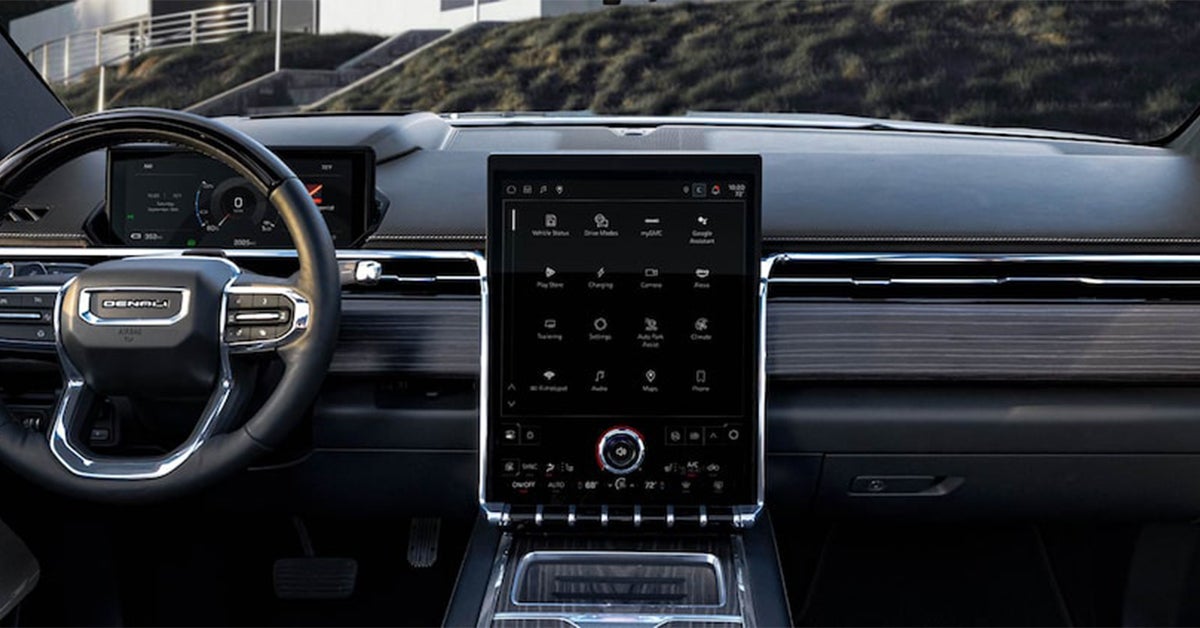
The infotainment system in your 2025 Sierra is more than a screen—it’s your truck’s main hub. It runs music, maps, Wi-Fi, and more. When you start the truck, it may ask you to log in. This is often where the GMC Sierra password prompt shows up. It’s part of the system’s profile setup. That profile saves your settings, your phone pairings, and even your favorite radio stations.
If you skip the setup or use someone else’s profile, the system may ask for a password again. This is one reason why Sierra asks for a password each time you start your truck. It wants to load the right data for the right driver. The 2025 Sierra infotainment login is tied to your email and your GMC account, not just the truck.
Here’s what your infotainment profile may control:
- Saved phone connections and Bluetooth preferences
- Radio and media presets
- Navigation history and saved places
- Screen layout and theme
- Wi-Fi hotspot details
This built-in GMC Sierra security feature keeps your data safe. But if the profile isn’t set up right—or is reset—you’ll likely see another GMC login request. This is true in the Sierra 1500, Sierra 2500, and Sierra 3500. A quick fix? Make sure you’re signed into the right profile and your email and password are up to date.
Why is Your GMC Sierra Asking for a WiFi Password?
If your Sierra keeps asking for a Wi-Fi password, the hotspot may be the reason. This feature is built into all models—Sierra 1500, Sierra 2500, and Sierra 3500. It lets you connect your phone, tablet, or laptop while on the road. But to keep your network safe, the truck may ask for the Wi-Fi code each time you try to use it.
You can find the default password in your truck’s settings menu. It’s also listed in the MyGMC app. If you or someone else changed the password, you’ll need the new one. This is part of a GMC Sierra security feature that protects your data. If the network name or password is wrong, you’ll see a login screen pop up again.
Here are a few reasons the system may ask for the Wi-Fi password:
- The default hotspot password was changed and not saved
- The phone or device is not set to auto-connect
- The infotainment system was reset after a software update
- The wrong network is selected in the device list
In these cases, you might also see a GMC Sierra password prompt or a GMC login request. These are normal and help make sure only approved users get access. If you’re not sure which password to use, check your settings or reset it through the app. For many owners, fixing this once stops the problem for good.
GMC Account Access and Connected Services
Many features in your 2025 Sierra depend on your GMC account. This includes remote start, OnStar, and even map updates. If you're not logged in, some tools may not work. This is often the reason a GMC login request pops up on the screen. It’s also why a GMC Sierra password prompt may appear when you least expect it.
Each user needs to log in with their own info. If you're using a Sierra 1500, Sierra 2500, or Sierra 3500, the setup works the same. The system links your email and password to your truck. That way, your settings and services follow you. But if the info is wrong—or you haven’t signed in yet—the system will ask you to.
Here are some things that may need a GMC login:
- Viewing or updating your OnStar plan
- Checking real-time alerts and service updates
- Using your phone as a key or remote control
- Getting access to saved map and drive data
- Managing app settings in the 2025 Sierra infotainment login
This built-in GMC Sierra security feature keeps your data safe and private. If you're sharing the truck, make sure each person has their own login. If you forget your password, use the reset link on the screen. That will stop the login loop and get your connected tools back up and running.
What Should you Do if Your GMC Sierra Keeps Asking for a Password Repeatedly?
If your GMC Sierra keeps asking for a password again and again, something isn’t working the way it should. This can happen in the Sierra 1500, Sierra 2500, or Sierra 3500, and it’s usually tied to a login issue or system glitch. You may have the right info, but the truck keeps asking anyway.
A repeated GMC Sierra password prompt may point to one of the following:
- The wrong user profile is set
- A recent software update caused a system reset
- The truck lost connection with your GMC account
- A saved password is outdated or missing
- A bug in the 2025 Sierra infotainment login system
When this happens, the GMC Sierra security feature can mistake you for a new user each time. This is often why Sierra asks for a password at startup or when you connect your phone. The fix might be as easy as switching to the right user profile or updating your sign-in details.
If the problem won’t stop, you can also try these steps:
- Delete old or unused user profiles
- Restart the infotainment system fully
- Reset your GMC login request password
- Check for system updates at your local dealership
These quick steps often solve the problem. If not, your local team at Robert Brogden’s Garden City GMC can help get things back on track.
Trusted Device Settings and PIN Security Features
Your GMC Sierra may ask for a password if your phone or device isn’t marked as “trusted.” This is part of the built-in GMC Sierra security feature. It helps keep your info safe. But it can also be the reason why Sierra asks for a password each time you start the truck.
If you drive a Sierra 1500, Sierra 2500, or Sierra 3500, you may run into this issue. The system is trying to be safe. But if your phone isn't saved as trusted, you may see a GMC login request over and over again. This can happen even if your password is right.
To help avoid this, make sure:
- Your phone is set as a trusted device in the system
- The PIN for your account is saved and correct
- You have the latest software update installed
- You’re logged in to the correct user profile
PIN codes may also cause problems. If you enter the wrong one, the system may block access until you reset it. These tools are part of the 2025 Sierra infotainment login setup and are meant to keep your truck and your data safe. Check your settings to make sure everything is up to date. A few small fixes can stop the repeated GMC Sierra password prompt from showing up again.
Working With OnStar Support for Password Issues
If the GMC Sierra password prompt keeps showing up and you’ve tried all the basic steps, it may be time to call OnStar. The OnStar team can help fix login errors tied to your truck's apps and features. This is true for the Sierra 1500, Sierra 2500, and Sierra 3500.
The OnStar system works with the 2025 Sierra infotainment login to manage your connected tools. If there’s a bug or account issue, OnStar may be the only way to fix it. They can also reset your password or help you sign in to your GMC account again.
Here’s how OnStar support can help:
- Reset your login or PIN over the phone
- Walk you through steps to clear a system error
- Help confirm which user profile is linked to the truck
- Check if the GMC Sierra security feature is blocking access
- Assist with re-syncing your phone or trusted device
You can press the blue OnStar button in your truck to get live help. You can also call their support number for account help. If the system keeps asking why you're not signed in, why Sierra asks for password may come down to a deeper issue OnStar can help solve.
How to Troubleshoot and Prevent Recurring Login Prompts
If you keep seeing a GMC Sierra password prompt, don’t worry—there are a few steps you can take to fix it. Whether you're driving a Sierra 1500, Sierra 2500, or Sierra 3500, these steps apply. Most login issues come from user profiles, saved settings, or small software bugs.
To avoid seeing the prompt each time you start the truck, try the steps below:
- Make sure the right user profile is selected
- Log in to your GMC account before driving
- Set your phone as a trusted device
- Check your system for software updates
- Reset your password if you think it’s wrong
The GMC Sierra security feature is built to protect your info, but it can cause repeated prompts when the setup isn’t right. The 2025 Sierra infotainment login may also need to be updated or synced again. If you're still getting a GMC login request, contact OnStar or your local dealer for help.
By checking these simple things, you can stop your truck from asking why Sierra asks for password every time. Most issues are easy to fix and only take a few minutes.
When Should You Seek Professional Help with Your GMC Sierra?
Sometimes, the best way to fix a tech issue is to let the pros take a look. If your GMC Sierra password prompt won’t go away—even after you've tried all the steps—it may be time to stop by a certified GMC dealership.
A trained tech can spot system errors, update your software, or check for hidden problems in your Sierra 1500, Sierra 2500, or Sierra 3500. This is especially true if you’ve seen a GMC login request again and again or if the 2025 Sierra infotainment login won’t work no matter what you try.
Visit a certified GMC dealership if:
- You’ve reset your password and it still won’t work
- The screen freezes when you try to log in
- You see an error message after a system update
- You think your system may have a software bug
- You need help adjusting GMC Sierra security features
If You're near Quinby, Holcomb, or Mansfield our team at Robert Brogden's Garden City GMC can walk you through the fix and explain why Sierra asks for password prompts. Their team knows these trucks inside and out—and they’ll help you get back on the road with peace of mind.
Common Questions About the GMC Sierra Password Prompt
If your GMC Sierra keeps asking for a password, you’re not alone. Many drivers across Quinby, Holcomb, and Mansfield have run into this issue, especially with the latest 2025 models. The answers below will help clear up what’s causing the problem and when it might be time to get expert help.
Why does my GMC Sierra keep asking me to enter a password?
Your GMC Sierra is likely prompting for a password due to an infotainment system login, a connected services profile, or a Wi-Fi hotspot setting.
Is this password prompt related to the infotainment system or vehicle security?
Yes. The prompt is most often linked to the infotainment profile login, though it can also involve built-in GMC Sierra security features such as PIN codes or trusted devices.
How do I reset or disable the password requirement?
You can reset the password through the login screen using the “Forgot Password” option or by updating settings in your MyGMC app. You cannot disable all password prompts, as some are built-in for security.
Could a software update resolve repeated password requests?
Yes. A software bug may be causing the issue, and a dealer-installed update or OTA patch can often fix it.
When should I contact my dealer about this issue?
Contact your dealership if you’ve reset your login and the GMC login request still appears, or if the system glitches or won’t accept valid credentials.
Knowing the root of the problem makes it easier to fix. If you're still having trouble, your local GMC experts in Garden City can help get your Sierra 1500, Sierra 2500, or Sierra 3500 running smoothly again.
Get Your GMC Free From Errors with Garden City GMC
If your Sierra still asks for a password and you're not sure what to do next, we're here to help. The team at Robert Brogden's Garden City GMC is ready to answer your questions and walk you through each step.
We proudly serve drivers from Quinby, Holcomb, and Mansfield. Visit us to explore our wide selection of new and used trucks, including the Sierra 1500, Sierra 2500, and Sierra 3500. Whether you need a strong work truck or a premium ride with top tech, we have the right fit.
Still unsure which model or trim gives you the best features and fuel needs? Learn more about which GMC trucks need premium gas so you can plan smarter and save money long term.
Have questions about truck power? Check out which GMC trucks offer V4, V6, and V8 engines for better towing or speed. Or if you’re aiming for top luxury, the Denali Ultimate trim might be just what you need.
We’re here to help. Contact Robert Brogden's Garden City GMC today or stop by to speak with our team in person.
Get Directions to Robert Brogden's Garden City GMC
Disclaimer: All information is provided for general informational and entertainment purposes only. While we strive for accuracy, we cannot guarantee that all content is complete, current, or error-free. Any reliance you place on such information is strictly at your own risk. This article may include opinions and is not endorsed by, or officially affiliated with, any vehicle manufacturer or brand. Always consult official sources – such as the vehicle’s owner’s manual, authorized dealerships, or certified professionals – for the most up-to-date and personalized information.